Product

All featuresECHOEstimates & quotesProjects & schedulePhone & texts

Company

IndustriesPricingResourcesSign in
Features/Estimates & quotes

Construction estimating software
your clients say yes to

Answer the estimate questions on site or measure the plans, then build the quote from your own price book with options, product photos, discounts, tax and a payment plan. Send it as a link the client signs, or sign together on your tablet.

In every ECHOPS plan unless noted · 14-day free trial

A contractor reviewing an estimate on a tablet in a showroom
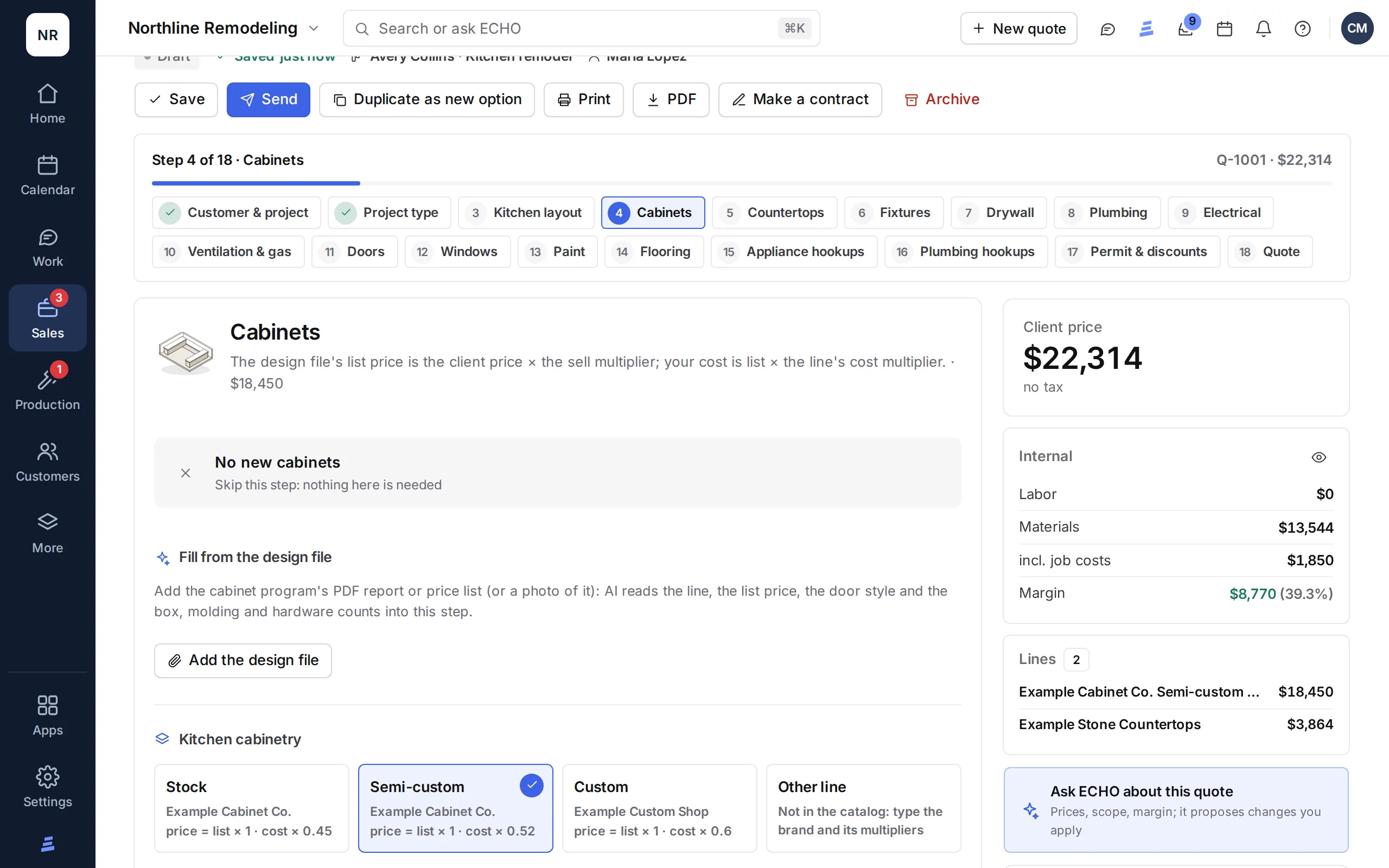
The ECHOPS quote builder: cabinets priced from the price book, with the client price, cost and margin

See it in action

Watch a quote get built, step by step

A kitchen quote from start to finish: the customer and project type, cabinets, countertops, the other steps, discounts and tax, and the documents it prints.

3:08 · Filmed in ECHOPS with sample dataTranscript and chapters →

What you get

Contractor quoting software,
signed on site or by link

01

On-site estimates and takeoffs

Kitchen and bathroom questions, counts and notes, photos and a layout drawing on site. Working from plans? Set the scale, measure lengths, areas and counts, and send them to the quote.

02

Your price book

Items priced by size, by the unit or as an allowance, with cost parts, markups and waste, plus a product catalog your suppliers’ price sheets keep current, and crew roles.

03

Options and payment plans

Send several quotes as options. Payments by stage or a lender's financing plan (the client applies with the lender), with discounts and tax worked out to the cent.

04

Quote links

Each quote goes out on a link. You see when it's opened, the client signs with their name and signature, and the deal moves to Won.

05

Change orders

Extras, credits or no-charge changes with lines from your price book, signed in person or by link and added to the contract total.

06

ECHO in the quote builder

ECHO starts a draft quote from your estimate sheet and suggests changes from a photo or a note. You apply only the edits you agree with.

Clients comparing cabinet door samples with a designer

In practice

From the design file
to the signed quote

  • Fill cabinet lines from your design program's export
  • Search Home Depot or Google Shopping for live prices and add items at cost with your markup
  • Swap a finish on the final quote and every price follows
  • Product photos on the quote, and PDFs with your logo attached to the email or downloaded

Works with

Estimating software for small contractors,
connected to the job

How it works

How construction estimating software works in ECHOPS

  1. Set your prices onceGive each Price Book item the rule that fits: a set price, a minimum charge, by project size, by quantity, cost plus markup, a target margin or an allowance. Add the cost behind it: sub labor, crew hours, materials with waste and fees.
  2. Measure on site or from plansFor kitchens and bathrooms, answer the on-site estimate questions, take photos and draw the room to scale. Working from plans, set the scale and measure lengths, areas and counts, then send the quantities to the quote. Other work starts from the deal.
  3. Build the quote step by stepAdd items from Home Depot or Google Shopping at cost times your markup, or let AI read a cabinet program’s report into the cabinet lines. When a supplier’s price sheet changes your costs, bring a draft quote up to current prices.
  4. Give the client choicesOffer options in one quote, add discounts and tax, and set a payment plan by stage or lender financing.
  5. Send it and see it openedYou see when the client opens the link, and they sign online or in person. The deal moves to Won by itself.
  6. Keep it right after the saleChange orders are signed online and billed on an invoice of their own.

What’s included

Contractor estimating software that keeps your margin in view

Kitchen and bath shops: see kitchen and bath estimating software. Free: estimate template and proposal template.

Remodelers, HVAC and plumbing companies: see remodeling estimating software, HVAC estimating software and plumbing estimating software.

Estimating from plans: see construction takeoff software. Comparing tools: see the best construction estimating software.

Straight answers

Before you pick estimating software

Not in ECHOPS today:
  • A national cost database. ECHOPS prices from your own price book and your suppliers’ price sheets.
  • A card reader or Tap to Pay. Clients pay invoice links online by card, Apple Pay, Google Pay or ACH.
  • Native apps. ECHOPS runs in your phone’s browser and installs to the home screen; an iPhone app is on the way.
Good to know: the on-site estimate questions cover kitchens and bathrooms; other trades quote straight from the Price Book. New workspaces start with a sample price book, so plan time to load your prices. Plans start at $149/mo with 3 users.

Questions

Estimating software, answered

What is construction estimating software?

Software that turns your prices and quantities into a quote the client can sign. Good tools keep a price book, track cost and margin on each line and send the quote as a link. ECHOPS does all three, then carries the signed quote into the job and invoices.

What should I look for in estimating software for contractors?

Prices you control, your real costs behind each line, options, a payment plan and e-signatures, plus takeoffs if you estimate from plans. Our buyer’s guide lists more questions.

Can I bring in my existing price list?

Yes. Download the Price Book as a CSV, add your list and import it back, or import a supplier’s own price sheet (CSV or Excel) into your catalog. You see every row before anything is saved.

Does ECHOPS handle markup and margin?

Yes. Price items at cost plus markup or at a target margin, and see your margin as you build. The markup calculator shows how the two relate.

How much does ECHOPS cost?

Solo is $149/mo with 3 users, Crew $299/mo with 8 and Company $599/mo with 20. Extra users are $25/mo, and yearly billing costs 10 months’ price. The free trial runs 14 days with no credit card. Estimates, quotes, e-signatures and change orders are in every plan.

Do small contractors need quoting software?

Not on day one, but it helps once quotes pile up. Quoting software keeps your prices in one place, adds markup and tax the same way every time and sends a link the client can sign. ECHOPS does that and keeps the signed quote with the job. Not ready yet? Start with our free estimate template.

Is there an all-in-one estimating app for contractors?

ECHOPS is one option: estimates, quotes, e-signatures, change orders, projects and invoices in one system. It runs in the browser on any phone or tablet and installs to the home screen; there’s no app-store app yet, and an iPhone app is on the way. See how it works on your phone.

Does it handle residential construction estimating?

Yes. ECHOPS is set up for residential jobs: on-site questions for kitchens and bathrooms, takeoffs from plans, prices by project size, unit or allowance, options the homeowner can choose, and payment plans by stage or lender financing.

Your next job,
from one place

Try ECHOPS free for 14 days with your own leads and jobs. No credit card, and your workspace is ready in minutes.

Special price: your first 2 months from $49/mo. Limited spots, so sign up today.