Product

All featuresECHOEstimates & quotesProjects & schedulePhone & texts

Company

IndustriesPricingResourcesSign in
Features/Payroll & commissions

Construction payroll software,
ready for your provider

Time sheets, time off and commissions in one place. ECHOPS works out each pay run with overtime, paid days off, salaries, commissions and expense paybacks, then exports it for your payroll provider.

In every ECHOPS plan unless noted · 14-day free trial

A roofing crew at work on a roof
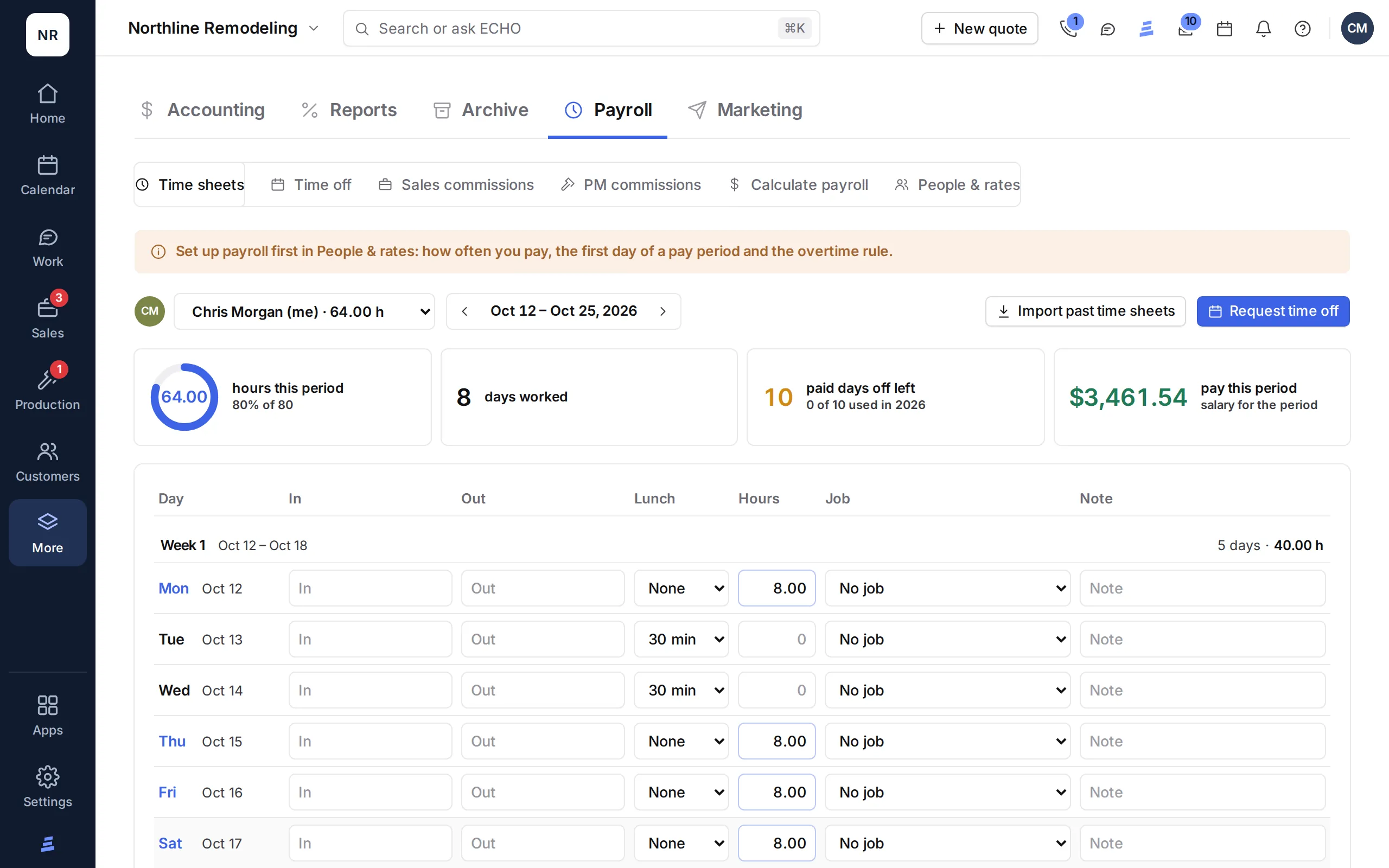
ECHOPS Payroll: a time sheet with the period's hours, days off and pay
Hours, days off and pay per period

See it in action

Watch hours become a pay run

How you pay, people and rates, time sheets, time off, commissions, and working out and exporting a pay run.

3:45 · Filmed in ECHOPS with sample dataTranscript and chapters →

What you get

Construction payroll,
worked out next to your jobs

01

Time sheets

Clock in and out or type hours, with lunch, by day. Import past time sheets from a CSV.

02

Time off

Paid and unpaid days, a yearly allowance, and approvals by the right person.

03

Commissions that track the deal

Rules for sales, change orders, job profit and reviews. Lines wait until the job is done and follow the deal if it changes.

04

Overtime handled

Past 40 hours in a workweek at 1.5×, even when a week crosses the pay period.

05

Pay runs

Preview, recalculate with bonuses and adjustments, finalize and export the CSV.

06

Kept private

People see their own pay and managers see the people they look after. No tax IDs or bank numbers are stored.

A site worker in a hard hat and safety vest

In practice

Who sees
what

  • Owners and admins run pay, rates and settings
  • Managers keep their people's time sheets and time off
  • Everyone else sees their own
  • ECHO, the AI, talks about pay with admins only

Payroll comes with the Company plan. ECHOPS doesn't pay anyone or file taxes: it hands the numbers to your payroll provider.

Works with

A construction payroll system,
connected to the job

How it works

How construction payroll software works with your provider

  1. Set up people and ratesPick each person’s pay type (hourly, salary or commission only), your pay schedule (weekly, every two weeks, twice a month or monthly) and your overtime rule. Tax IDs and bank numbers stay with your payroll provider: ECHOPS fields refuse them.
  2. Fill in time sheetsEach day gets clock in, clock out and lunch, or just the hours, grouped by workweek. Owners and admins can import past time sheets from a CSV.
  3. Approve time offPeople ask for paid or unpaid days off. The approver gets the request in their messages, and the answer goes out by email.
  4. Let commissions add upSet rules per person: a percent of what they sold, a percent of signed change orders or of job profit on jobs they manage, or a bonus per Google review. A sales commission opens when the deal is won and is ready to pay once the job is completed.
  5. Check the pay runStart the run for the period and ECHOPS works it out: regular hours, overtime past 40 hours in a workweek at 1.5×, paid time off, salaries, ready commissions and expenses to pay back. Add a bonus or an adjustment, then Finalize to lock it.
  6. Export it for your providerDownload the CSV, one row per person with hours, pay, commissions, gross pay and reimbursements, and enter it in your payroll provider. The provider pays everyone and files the taxes.

Who does what

ECHOPS works out pay. Your provider pays it.

Payroll task
ECHOPS
Your payroll provider
Time sheets and time off
Yes
Gets the hours in the export
Overtime past 40 hours a week at 1.5×
Yes
Gets the overtime hours and pay
Commissions and review bonuses
Yes
Gets one commission amount per person
Gross pay per person
Yes
Starts from it
Paying people
No
Pays everyone
Payroll taxes and filings
No
Files the taxes
Tax IDs and bank account numbers
No never stored
Keeps them
Certified payroll reports
No
Ask your provider

Pricing your crew’s time? Try the labor rate calculator, and see what each job made in profit per job reports.

Straight answers

Before you pick construction payroll software

Not in ECHOPS today:
  • Paying anyone or filing taxes. ECHOPS never moves money.
  • Certified payroll for prevailing-wage jobs.
  • GPS clock-in. Time sheets are typed in by day.
  • Daily overtime. ECHOPS counts overtime by the workweek; add an adjustment where your state also counts by the day.
Good to know: Payroll, with its time sheets, time off, commissions and pay runs, is in the Company plan ($599/mo with 20 users). This isn’t tax or legal advice: pay and overtime rules vary by state, so check yours with your accountant or payroll provider.

Questions

Payroll software for construction, answered

What is construction payroll software?

Software that turns field hours, overtime and commissions into each person’s pay. Some tools also pay people and file taxes; ECHOPS doesn’t. It works out the pay run and exports it for the payroll provider you already use.

Does ECHOPS pay my employees?

No. You finalize the pay run in ECHOPS, export the CSV and run payroll in your provider, which pays everyone and files the taxes.

Does ECHOPS do certified payroll?

No. Certified payroll reports for public and prevailing-wage work aren’t in ECHOPS. Ask your payroll provider whether it prepares them.

How does ECHOPS count overtime?

Hours past 40 in a workweek are paid at 1.5×, or you can set no overtime. If your state also counts overtime by the day, add an adjustment on the pay run.

Can I pay subcontractors through payroll?

Subs aren’t on payroll. Their pay lives on each job’s labor sheet, where you record sub payments, and they see their sheet in the crew portal.

Which plan includes payroll, and what does it cost?

Payroll is in the Company plan: $599/mo with 20 users, or $5,990 a year. Solo ($149/mo) and Crew ($299/mo) don’t include it. Try ECHOPS free for 14 days with no credit card.

How do you do payroll for a construction company?

Collect hours by workweek, work out overtime and paid time off, add commissions and bonuses, then pay people and file taxes through a payroll provider. ECHOPS handles the first part and exports a CSV per pay run; your provider pays and files. Overtime and tax rules vary by state, and this isn’t tax advice: check your state.

What’s the best payroll software for a construction company?

It depends on what you want it to do. If you want one tool to pay people and file taxes, that’s a payroll provider. If you want field hours, overtime and commissions worked out next to your jobs, ECHOPS prepares the pay run on the Company plan and hands it to the provider you already use.

Your next job,
from one place

Try ECHOPS free for 14 days with your own leads and jobs. No credit card, and your workspace is ready in minutes.

Special price: your first 2 months from $49/mo. Limited spots, so sign up today.