Product

All featuresECHOEstimates & quotesProjects & schedulePhone & texts

Company

IndustriesPricingResourcesSign in

ECHO

Meet ECHO, the AI teammate
in your team chat

  • Joins any chat you add it to and stays quiet until someone types @echo
  • Answers from your own records, with links, and only shows what the person asking may see
  • Puts every booking and status change on a card and waits for your Confirm; emails and texts it writes as drafts you send
  • Sends you a morning plan built from your My Day, in your own ECHO chat
  • Answers from your meetings' AI minutes and starts quotes as drafts
# office
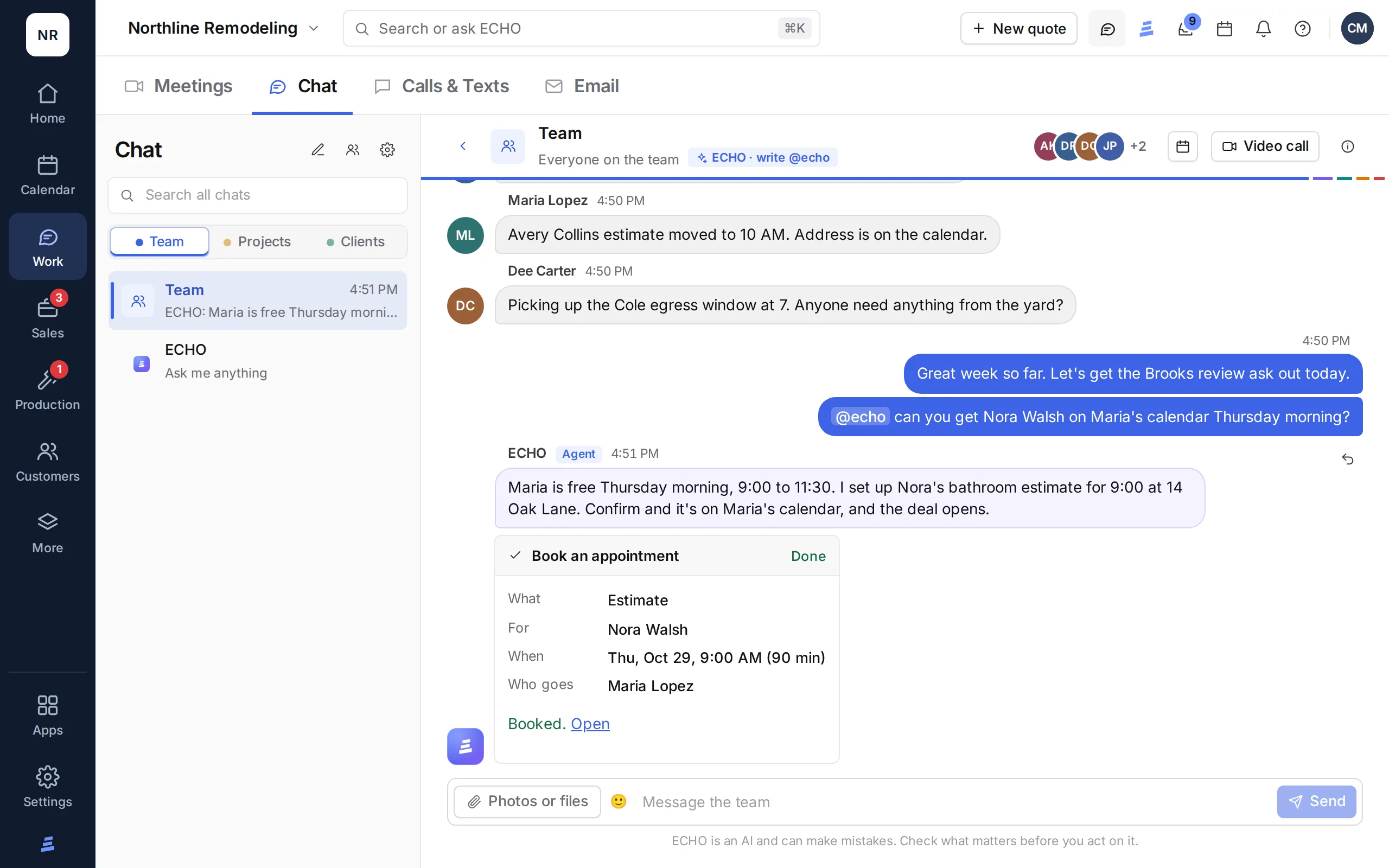
@echo book Nora Walsh's estimate with Maria on Thursday morning.

Maria is free Thursday from 9:00 to 11:30. Nora's lead is a bathroom remodel in Raleigh. Here is the booking:

Proposed · Book appointment

Estimate · Nora Walsh

WhenThu, Oct 22 · 9:00 AM
Who goesMaria Lopez
ThenThe deal opens on Deals
ConfirmNot now

Nothing changes until someone confirms. Sample names and times.

ECHO in the ECHOPS Team chat: asked to book an estimate, it proposes the appointment and books it on Confirm

See it in action

Watch ECHO at work

Asking ECHO, the drafts it writes for you, changes that wait for your Confirm, files, your own ECHO chat, and ECHO in team chats.

2:59 · Filmed in ECHOPS with sample dataTranscript and chapters →

How it works

A teammate that waits for its name

ECHO is part of your team chat. It stays out of the way until someone mentions it, asks before it books or changes anything, and leaves the sending to you.

Lives in your team chat

Add ECHO to the team channel, a group, a deal chat or a direct message. It reads the chats it is in, so it knows the context.

Speaks when you say @echo

In a shared chat it never jumps in. Type @echo with a question or a job, and it answers right there. In your own ECHO chat, just ask.

Asks before it acts

Bookings, status changes, to-dos and notes come to you as a card and happen only after you press Confirm. Emails and texts open in your own composer, and you send them.

Sees what you see

ECHO works inside the role of the person asking. Pay, accounting, marketing and activity answers stay with owners and admins.

Abilities

What ECHO can do, area by area

Every part of ECHOPS, what ECHO may read or change there, and when it asks you first.

Asks first means ECHO shows the change on a card and waits for your Confirm. Draft only means ECHO writes it and you finish or send it yourself. Admins only means it answers questions about that area only for owners and admins.

Your workspace

Where the work happens
01

Overview

Asks first

Reads your Overview and My Day and answers questions about them. Adds or checks off your to-dos after you confirm. Each workday morning it sends your plan to your own ECHO chat.

02

Calendar

Asks first

Reads the calendar and who is free. Books an appointment after you confirm; an estimate for a lead opens its deal. Moving or canceling stays with you.

03

Meetings

Read only

Reads your meetings and their AI minutes to answer questions. Booking a meeting stays with you.

04

Chat

Read only

Reads the chats it is in and answers there when someone writes @echo, or anything you ask in your own ECHO chat. It doesn't start chats or message people for you.

05

Calls & Texts

Draft only

Reads your calls and texts and answers questions about them. Writes a text into your own composer for you to send. It never calls or texts anyone.

06

Email

Draft only

Reads the words of your email and answers questions about it. Writes an email into your own composer for you to send. It never clicks a link or opens anything inside an email.

07

Leads

Asks first

Moves a lead to another status and adds a note, after you confirm. It never contacts a lead.

08

Deals

Asks first

Moves a deal to another stage and adds a note, after you confirm. Never to Won, and it never sets a deal's value.

09

Quotes

Draft only

Builds a draft quote from your estimate sheet, after you confirm, for you to finish. It never sends a quote or changes prices.

10

Estimates

Read only

Reads estimates to answer your questions. It never changes them.

11

Projects

Asks first

Moves a project to another stage and adds a note, after you confirm. It never contacts the client.

12

Change Orders

Read only

Reads change orders to answer your questions. Writing and sending them stays with you.

13

Orders

Asks first

Finds an order by its number. Updates its status, ETA, pick-up deadline, order number or where it's delivered, after you confirm; never its cost or payment.

14

Labor

Read only

Reads the crew schedule, labor sheets and sub payments. Assigning crews and subs stays with you.

15

Service Calls

Read only

Reads service calls and their warranty answers. Opening and updating tickets stays with you.

16

Contacts

Read only

Finds a contact and everything tied to them.

17

Reviews

Read only

Reads where each review ask stands.

18

Feedback

Read only

Reads survey answers and scores.

19

Training

Read only

Reads who is assigned what and how they did.

20

How-to Guide

Read only

Answers “how do I…” from the How-to Guide, with a button to the right page.

21

Documents

Read only

Finds documents and company files.

Data and control

Read only, so your setup stays yours

Activity

Answers about it only for admins
Read onlyAdmins only

Automations

Answers about it only for admins
Read onlyAdmins only

Knowledge Base

Answers anyone on your team, with links to the article; on WhatsApp it can save a note
Read only

Price Book

Answers anyone on your team; costs only for admins
Read only

Integrations

Answers about it only for admins
Read onlyAdmins only

Team

Read only

Locations & quotes

Read only

Settings

Read only

More

Read only

Accounting

Answers about it only for admins
Read onlyAdmins only

Reports

Answers about it only for admins
Read onlyAdmins only

Archive

Read only

Payroll

Answers about it only for admins
Read onlyAdmins only

Marketing

Answers about it only for admins
Read onlyAdmins only

ECHO only sees what the person asking can see. Viewers and support sessions get answers only, never changes. ECHO never sends, signs, deletes or archives anything, and never touches prices or payments.

Guardrails

What it
will never do

ECHO works inside the same rules as your team: it only sees what the person asking can see, viewers and support sessions get answers only, and its changes run through the same checks as the pages.

  • Never speaks up in a shared chat unless someone types @echo
  • Never sends an email or text, calls anyone, signs or deletes; bookings and status changes wait for your Confirm
  • Never clicks a link or opens anything inside an email
  • Never changes prices or the price book, and its quotes stay drafts
  • Keeps pay, accounting and marketing answers for admins

Included in every plan

Fair use, counted openly

Each plan has a monthly AI allowance, counted in AI tokens: 2 million on Solo, 6 million on Crew and 15 million on Company, reset each calendar month (UTC). Every AI feature draws on it. When it runs out, AI features pause until the next month, and nothing is charged. Design images and voice-agent minutes are counted separately.

Questions

AI for contractors, answered

How can contractors use AI in their business?

Start with the paperwork and the follow-up: summarizing calls, writing meeting minutes, reading receipts and order confirmations, drafting emails and texts, and answering questions from your own records. In ECHOPS, ECHO does those inside your team chat, asks before it books or changes anything, and leaves the sending to you.

How is AI used in construction project management?

To keep track without retyping. ECHO can move a project to its next stage, book an appointment, update a material order’s status or ETA, add a note, and answer questions like when the countertop template is or which crew is on a job, from your records. Every change comes to you as a card first and happens only after you press Confirm.

Is ECHO an AI assistant or does it act on its own?

It’s an assistant that asks first. In shared chats ECHO stays quiet until someone types @echo, answers only with what the person asking may see, and puts every booking and status change on a card that waits for Confirm. Emails and texts it writes as drafts in your own composer, and you send them. It never changes prices or the price book, and its quotes stay drafts.

What AI tools for contractors come with ECHOPS?

ECHO in your chats, Write with AI for emails and texts, call summaries with Phone & texts, meeting minutes, AI that reads receipts, checks, order confirmations and cabinet design reports, a quote assistant that starts drafts, and the AI design studio for kitchen and bath photos.

How much does the AI cost?

It’s included in every plan with a monthly allowance of AI tokens: 2 million on Solo, 6 million on Crew and 15 million on Company. When it runs out, AI features pause until the next month, and nothing is charged. Plans start at $149/mo, and with our special price your first two months are $49, $59 or $69 a month.

Where does my data go when I use ECHO?

ECHO and the other text AI features run on Anthropic’s models: your question plus the records needed to answer it are sent to them. Design studio images use Google’s Gemini image model. ECHO only sees what the person asking can see. The full list of providers is in the trust center.

Your next job,
from one place

Try ECHOPS free for 14 days with your own leads and jobs. No credit card, and your workspace is ready in minutes.

Special price: your first 2 months from $49/mo. Limited spots, so sign up today.